Over the last 12 months, I built 13+ AI tools and prototypes, some as weekend experiments, some that ended up influencing product direction at Flipkart.
This is a real log of what I built, what it changed, and what it taught me on how fast I could go from idea → working product → conviction.
Disclaimer: Some of these projects are internal to Flipkart. I’ve kept descriptions at a level that shares patterns without exposing specifics. The usual caveat applies - a lot of internal data and decisions have been omitted for obvious reasons.
TL;DR
-
Building compresses learning cycles by 10x. A 1-day prototype teaches more about feasibility, cost, and user behaviour than weeks of docs and design reviews.
-
POCs are the fastest way to create alignment. A demo beats a PRD every time. The SLAP demo, conversational commerce POC, and self-serve data tool all started as day-builds and became alignment artifacts.
-
Speed changes the PM role. You stop asking “can we build this?” and start asking “what’s worth building?” That second question is the actual job.
-
Builders get different access. Engineers and leadership engage differently when you’ve shipped something yourself. Sharper feedback, more honest pushback, better collaboration.
-
The PM who can’t build anything is becoming a liability. Not because you need to write production code. But because the PMs who can go from idea to working prototype in a day are operating at a different speed.
Part 1: Solving My Own Problems
G-Meet Summariser
The problem: 15-20 minutes after every meeting writing up notes and action items. Every. Single. Time.
What I built: A Chrome extension that ingests a Google Meet transcript and produces a structured summary: decisions, open questions, action items with owners. One prompt, ~30 seconds.
The interesting bit: I built this well before Google shipped native AI summaries to Meet. Had a genuine head start for a while, and then it evaporated overnight when they launched it natively.
Which taught me something I keep thinking about: what’s the moat for tools like these? The platform owner will always have the distribution, the data access, and the integration depth. If your tool is a thin AI layer on top of someone else’s product, you’re one feature release away from irrelevance. That’s a real, uncomfortable question for a lot of what’s being built in the AI tools space right now, and I don’t think it has a clean answer yet.
The other lesson was about behaviour change. When note-taking was a 20-minute chore, I’d skip it for “smaller” meetings. At 30 seconds, I started summarising everything. Decisions that used to get lost in verbal agreements started getting documented. The compound effect on alignment over months was surprisingly significant.
G-Chat Auto-Read
The problem: 40+ chat spaces. The cognitive load wasn’t the content itself, it was the constant act of triaging what deserves attention.
What I built: A custom script that bulk-marks messages as read across Google Chat spaces. No AI, no clever prompting. Just a script that clears the noise so I don’t have to manually open and dismiss every conversation.
The interesting bit: Honestly, this is one of the most useful things I’ve built, and there’s zero AI in it. The highest-value automation isn’t always the smartest one. It’s the one that kills a daily friction point you’ve been tolerating for too long.
Chat tools assume every message deserves equal attention. At 40+ spaces, that assumption is completely broken. You spend real cognitive energy just triaging, not even reading, just deciding whether to read. This tool was a workaround for what is fundamentally a design problem in how these products handle attention at scale.
What it changed: “Clear my chat” went from a draining background task to something that just happens. Small win, but compounds daily.
JIRA via Natural Language
The problem: JIRA management is genuinely one of the biggest recurring pains I have as a PM. I like keeping things up to date, tracking across hundreds of JIRAs, ensuring everything moves as your context and requirements evolve, following up on blockers, tracking it all to closure. The surface area is enormous. And the tool fights you at every step: slow UI, unintuitive search, creating tickets from meeting notes is a multi-step chore, bulk updates feel like they were designed to waste your time. I hate the product. Can’t escape using it. (Every PM knows this feeling.)
So I went down the rabbit hole of automating as much of it as possible. Picked up Claude Code, and thanks to MCPs and Skills, the integration turned out to be surprisingly straightforward.
What I built: Natural language JIRA management. “Create a bug for the search ranking issue we discussed” becomes a ticket with the right project, epic, sprint, and labels. “Find all open P1s in the current sprint” surfaces them without ever opening the JIRA UI. Bulk updates, status changes, descriptions from rough notes, all prompt-driven.
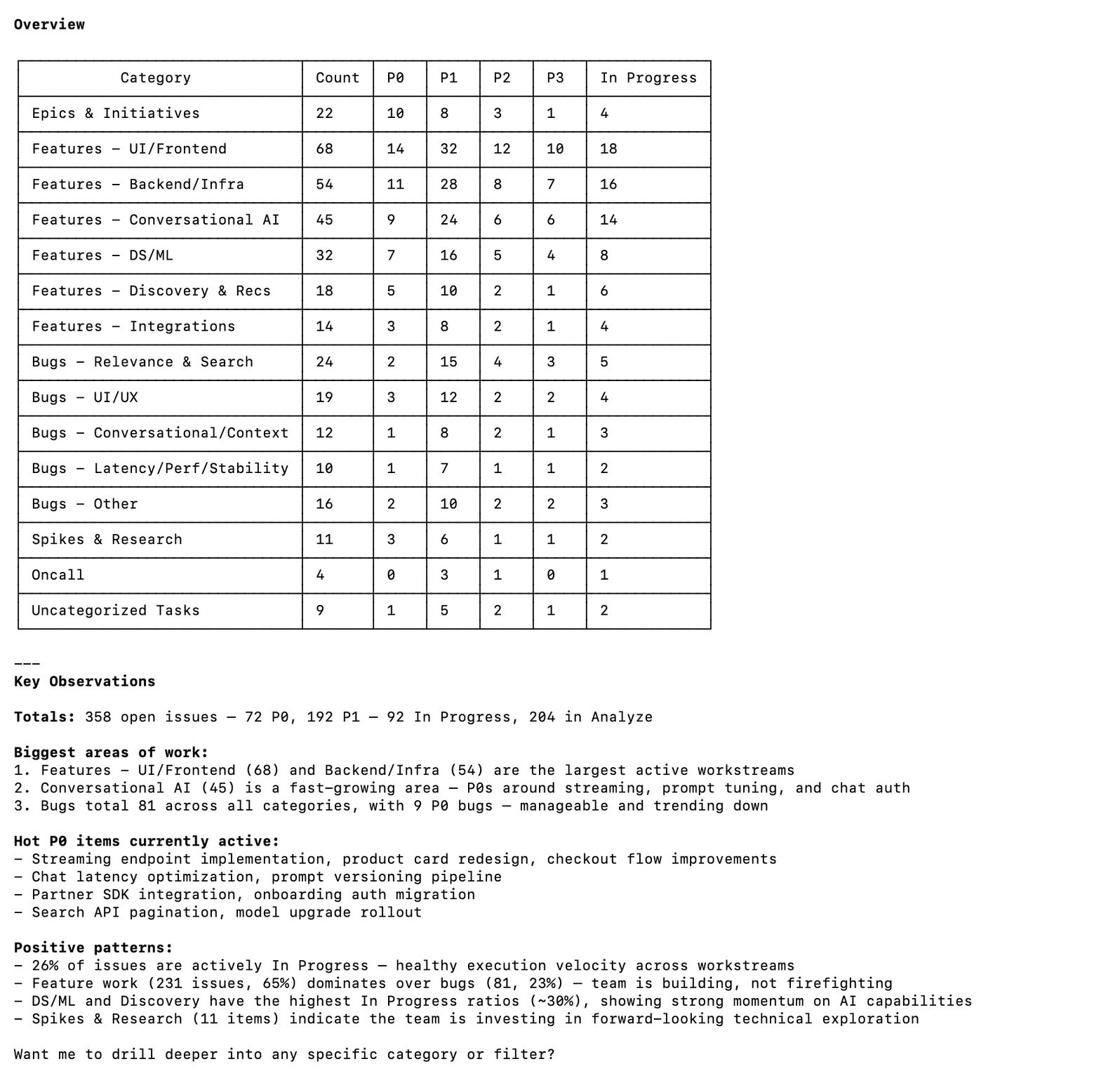
The interesting bit: I didn’t realise how much cognitive load “remembering to update the ticket” was consuming until I stopped doing it manually. Same relief as using a password manager for the first time, applied to project management.
The other thing: natural language interfaces expose how poorly structured most JIRA projects actually are. The model needs to know which project, which epic, which sprint, which labels. Bad JIRA hygiene = the tool struggles. Fixing the interface forced me to fix the underlying data, which was its own win.
What it changed: Most of my JIRA management is now prompt-driven. Rough estimate: 45 minutes a day reclaimed.
Whispr Flow
The problem: I wanted a voice-to-structured-text workflow. Record a thought while walking, get it formatted and filed. Every good tool for this either got blocked by IT policy (data leaving the device) or wasn’t reliable enough.
What I built: Whispr Flow, a completely offline speech-to-text app. Runs locally on-device using Whisper, super fast, no data leaves your machine. That last part is what helped me avoid the IT team’s concerns entirely. Record, transcribe, structure the output, done. Works for meeting notes, thought dumps, and async communication drafts.
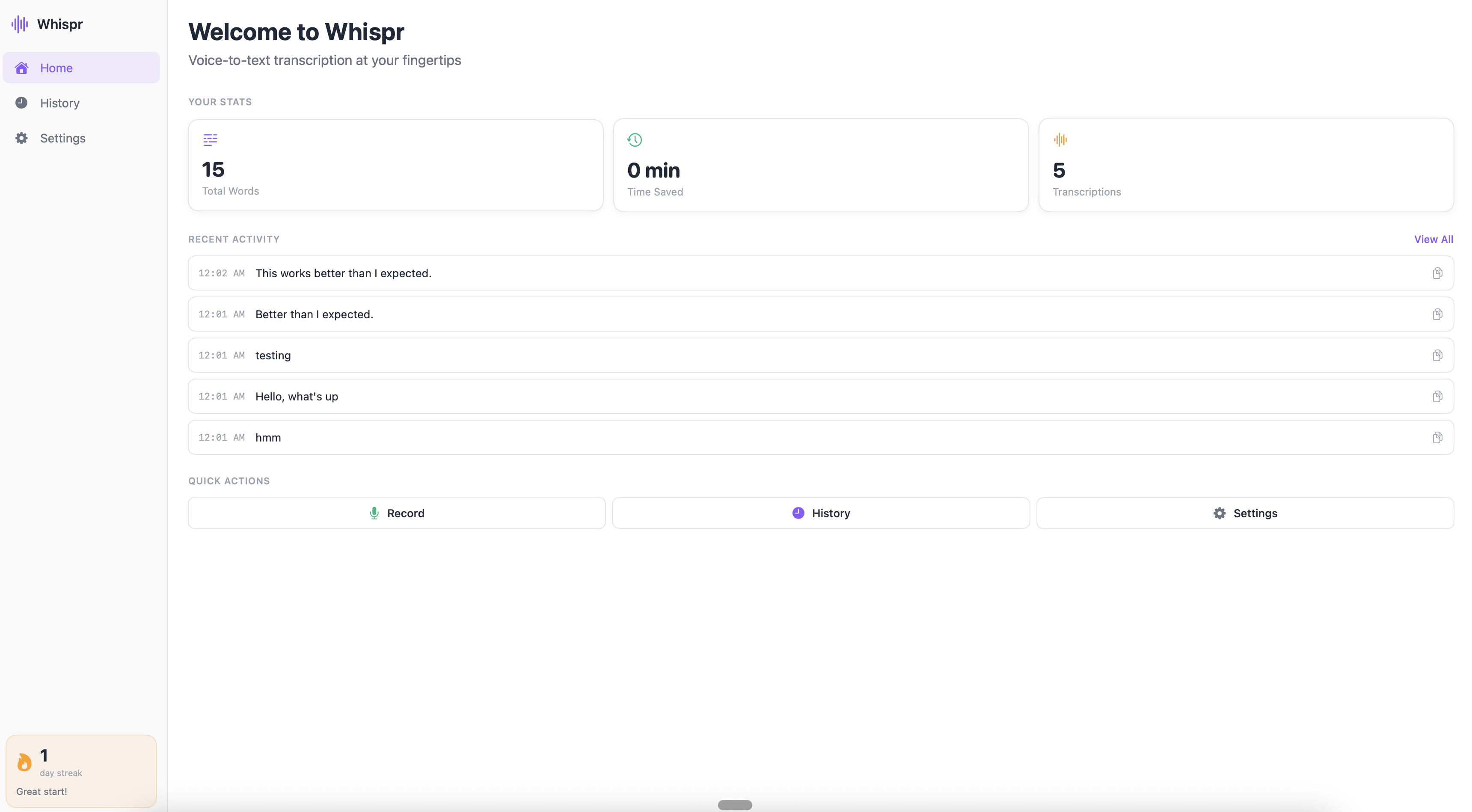
The interesting bit: Transcription is the easy part. The structuring, turning raw speech into formatted notes with headers, action items, tagged topics, is where 90% of the value lives. And that’s entirely a prompting problem. Voice-to-text also exposes how differently people think verbally versus in writing. My spoken thoughts are messier, more associative, and often more honest than what I’d type. The structuring step acts as a translator between how I think and how I need to communicate.
What it changed: Genuinely changed how I capture ideas on the go. Running backlog of structured thought-dumps that I mine for blog posts, product hypotheses, and meeting prep.
princejain.me
The problem: I wanted a personal website that was genuinely mine. Not a template with my name on it.
What I built: princejain.me, the site you’re reading this on. Built from scratch with Astro 5, self-hosted fonts, custom design tokens, and a content pipeline for blog posts.
The interesting bit: This is where AI-assisted development felt most natural. The loop of “I want the blog cards to look like this” → Cursor → see result → tweak → ship felt like working with a very fast junior developer. I’m not a frontend engineer, but with AI pair-programming I built something responsive, fast, and accessible. Designed exactly how I wanted it.
When you own the whole stack, even a simple one, you develop opinions grounded in real trade-offs. Not abstract preferences, but “I chose this because the alternative added 200ms to page load.” That kind of grounded thinking carries over into every product conversation.
What it changed: A portfolio I maintain and iterate on myself. Zero dependency on anyone else.
Part 2: POCs That Changed Product Direction
Every one of these took a day or less to build. Every one of them influenced weeks or months of product direction.
SLAP Day 0 Demo
The problem: At the start of SLAP (Flipkart’s agentic commerce platform), I needed alignment on what we were actually building. A deck felt insufficient. Leadership needed to feel the product, not read about it.
What I built: A working demo of an agentic commerce interaction. User conversing with an AI that searches products, compares options, simulates a purchase flow. One day. No production code, no backend. Just enough to make it feel real.
The interesting bit: This demo created more strategic clarity in 20 minutes than weeks of PRD review would have. Once people could interact with the hypothesis, conversations shifted from “is this the right thing to build?” to “here’s what we need to make this work.” Conviction to execution, in one meeting.
I’ve since started doing this for almost every major product bet. Before writing the spec, build the demo. The alignment it creates takes weeks off the planning phase.
What it changed: Became the alignment artifact for SLAP’s initial investment decision. As I wrote in my AI at Scale post, the gap between prototype and production is enormous, but the prototype told us what to build.
QueryGPT: Self-Serve Data Access
The problem: Deeply dependent on data analysts for every ad-hoc question. Want to know how query reformulation affects conversion? Write a request, wait 2-3 days, get a table. Follow-up? Start the cycle again.
What I built: A natural language interface to internal data (inspired by Uber’s QueryGPT). Plain English question → SQL query → result. Self-serve data access without knowing the exact table structure.
(Gemini-generated mock-up below, AI generated since it required a lot of masking of actual business data)
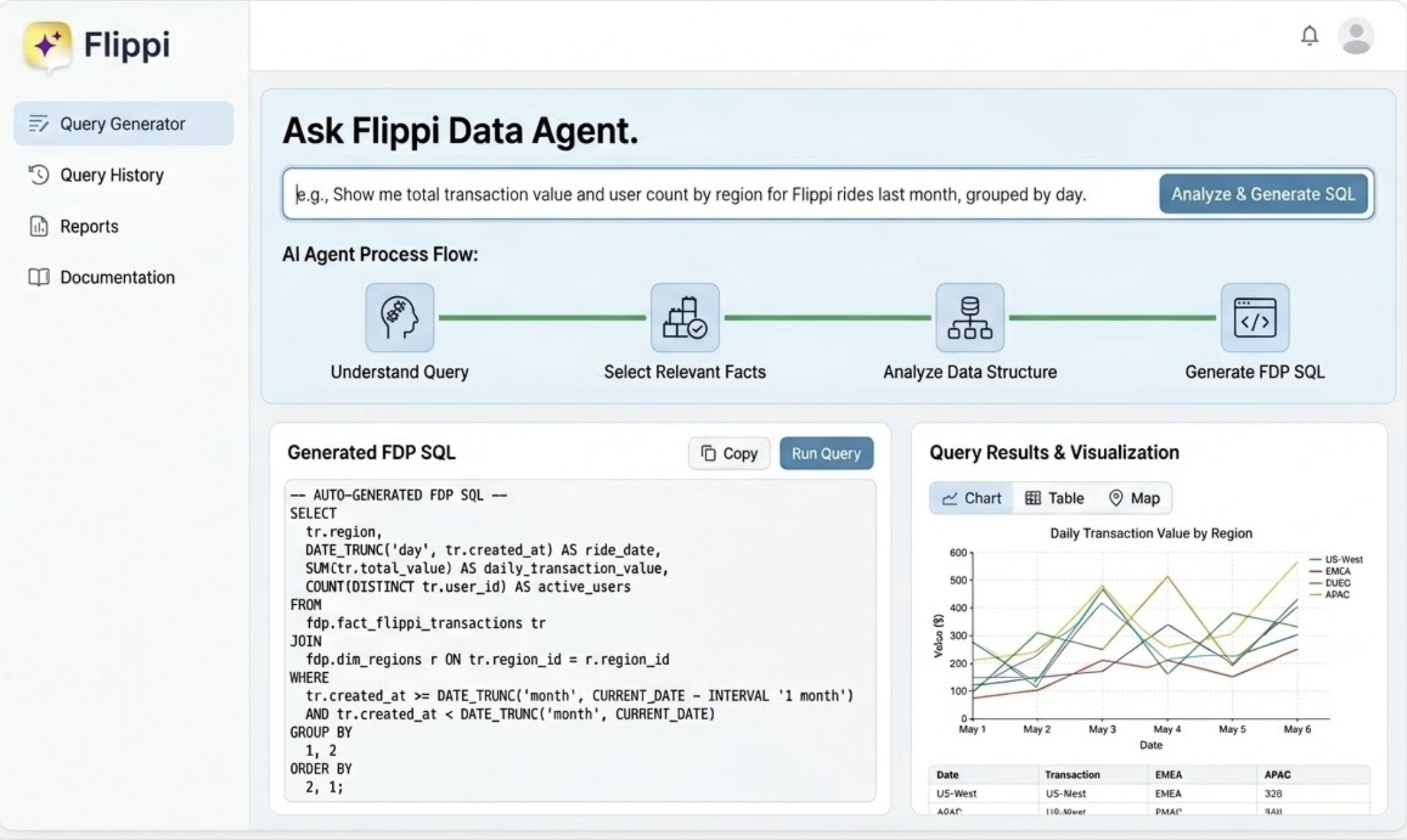
The interesting bit: The biggest unlock wasn’t speed, it was question quality. When answers take 3 days, you optimise for asking one really good question. At 30 seconds, you can follow threads: “What’s the conversion rate for search queries?” → “break that down by query type” → “show me long-tail specifically” → “what’s the average response time for those?” In 15 minutes, I’d done an investigation that would have taken a week of back-and-forth. The friction between “I wonder if…” and “here’s the answer” dropped to almost zero.
What it changed: Self-serve data superpowers. No more analyst queues for exploratory analysis. Pattern since adopted by other PMs on the team.
Commerce in Minutes: Conversational Shopping POC
The problem: The hypothesis underlying quick commerce is “fast = better.” But what if the interface itself was the bottleneck, not the delivery time?
What I built: A POC for commerce as a pure conversation. Describe what you need, get options, confirm, done. No browsing, no categories, no scrolling. Just a natural language transaction from intent to purchase.
The interesting bit: Two surprises.
First, the conversational interface surfaced a completely different type of shopping intent. In a traditional app, you search for a product you already know. In a conversation, people asked things they’d never type into a search box: “What should I order for a low-effort dinner for two?” or “Help me plan snacks for 8 people under 2000 rupees.” Goal-oriented requests, not product-oriented searches. No search box handles these well. A conversational agent handles them naturally.
Second, and this was the real insight: 3-4 curated choices instead of 200 results made people feel like they had better options, not fewer. Counterintuitive to everything I’d assumed about catalogue-rich commerce.
We started with “can we make shopping faster?” and ended up asking “can we unlock intents that current interfaces can’t even express?” Much bigger question.
What it changed: Became the seed of conversational commerce vision at Flipkart. One day of building, months of product direction.
SLAP Debug Dashboard
The problem: In AI products, the hardest part isn’t getting the model to work. It’s figuring out why it didn’t work the way you expected. LLMs are non-deterministic. You can’t reproduce bugs by replaying requests. If you didn’t capture the full trace at the time, that information is gone.
What I built: Three connected tools on Google’s Agent Development Kit (ADK):
- Log Tracer: Enter a conversation ID, see the complete trace. Every agent decision, tool I/O, LLM call with full prompt/response, all timestamped.
- Debugger: Flags anomalies automatically. Routing loops, hallucinated tool responses, latency spikes, cases where the model quietly worked around a failure instead of surfacing it.
- Annotation Tool: Takes faulty production cases and pushes them into our eval pipeline. Real failures feeding back into the golden set, not synthetic test cases.
I had a full-blown product note ready before I started building this: sections I wanted, how the screens should look, input methods, what the user sees after each action, tracing and logging requirements, the broad system structure. All of that went into the note first, then I gave it to Claude Code and got a ~90% version on the first attempt. (More on this approach below.)
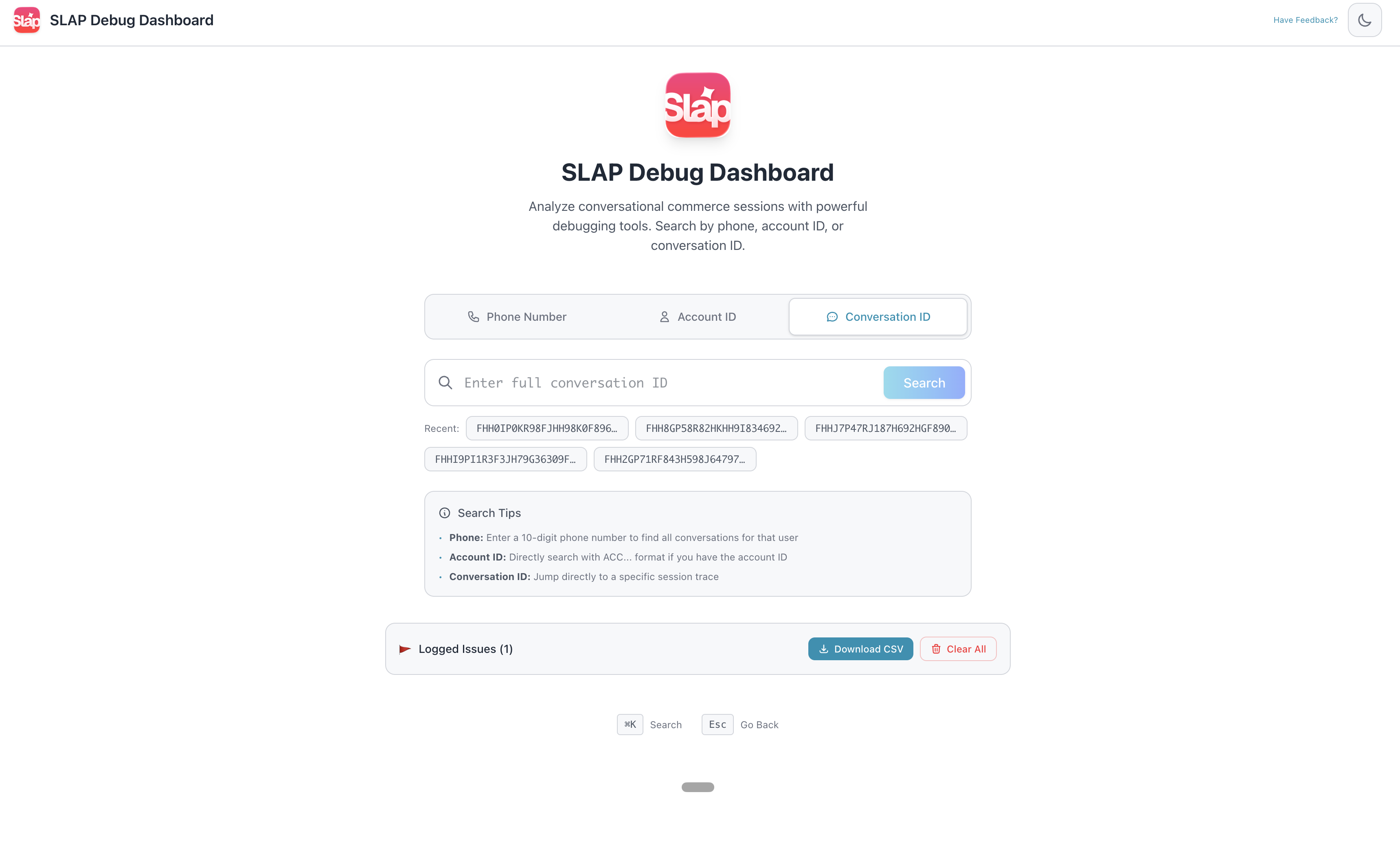
The interesting bit: This was my most technical build. Instead of just wrapping an LLM call, I was elbow-deep in Google’s Agent Development Kit (ADK)—reasoning through agent state and execution traces.
The biggest surprise? The credibility shift. I went from “the PM who asks annoying questions” to someone who actually understood the architecture. It completely transformed my conversations with engineering around system design and trade-offs.
Plus, I accidentally achieved the holy grail of internal tools: ridiculous DAU. Walking past the engineering team and seeing my vibe-coded dashboard open on almost every monitor is an unmatched feeling. Turns out, engineers will voluntarily use PM-written code if it makes debugging less miserable. ;)
What it changed: It became the backbone of how we debug SLAP. The annotation tool is now one of our highest-leverage investments, funneling real, painful production failures directly into our evals (which, as I noted in my AI at Scale post, is the only way they actually improve).
Part 3: The Frontier
AI-Native Production Code
The problem: The PM-to-code pathway usually ends at “prototype.” What if you pushed that boundary deliberately?
What I’m doing: I’ve assembled a small team (Frontend, Backend, Design and PM (me!)) that’s attempting 100% AI-driven production code. Claude Code, Cursor, the full stack. Not “AI helps an engineer write code faster.” AI writes the code. The humans provide context, verify correctness, and make the judgment calls. Early results are genuinely promising.
The interesting bit: The bottleneck is never code generation. It’s context and accountability: understanding the system well enough to verify that what was generated is correct and safe to ship. The constraint on who can contribute production code was always “can you write it?” AI removed that. What remains is “do you understand the system well enough to be accountable for the change?” That’s a judgment problem, not a coding problem.
Where this is heading: Too early to call it proven, but the initial signal is strong. I’m betting this becomes the default mode of working within a couple of years. The teams that figure it out first will have a real edge.
How I Vibe Code
These are learnings crystallized from burning literally hundreds of millions of tokens and various failed attempts at getting output I actually wanted. I vibe code almost every day, for fun and for building prototypes at work. Interestingly, what works is almost a replica of what you’d have given a junior developer in a non-AI era: clear context, clear expectations, then let them run.
1. Start with clarity, not vibes
This is the single biggest thing. Most people jump into vibe coding with the very first thought they have and start building from there. I’ve found that’s a deeply inefficient process. It doesn’t give the LLM enough input to make the right architectural choices, and the output isn’t holistic.
When you have clarity of what you want, write it down first. When I built the SLAP debug dashboard, I had a full product note ready before I wrote a single prompt: what sections the tool should have, how the screens should broadly look, input methods, what the user sees after each action, how they interact with the output, tracing and logging requirements, the broad system structure. All of that went into a product note, and then I gave it to Claude Code. Got a ~90% version on the very first attempt.
Sometimes you do need to brainstorm with the LLM, explore ideas, try things loosely. That’s fine. But when you know what you want, bring as much clarity as you can at the start. The difference in output quality is night and day.
2. Treat your CLAUDE.md / cursor rules as living documents
If you’re using Cursor or Claude Code, leverage Skills and custom CLAUDE.md files. These aren’t something you create once and forget. Every vibe coding session, your core frustrations, issues you hit, and best practices that worked should go back into these documents. They’re your accumulated context, the thing that makes session #50 dramatically better than session #1.
3. Break builds into phases, not one mega-prompt
Don’t try to build everything in one shot. Even with a clear product note, break it into logical phases: get the data layer right first, then the UI, then the interactions. Each phase gives you a checkpoint to verify the LLM’s choices before it builds on top of them. One mega-prompt produces something that looks complete but is fragile underneath.
4. Review the first 20% obsessively
The architectural choices the LLM makes in the first few minutes (file structure, state management, data flow) compound through the entire build. If the foundation is wrong, everything built on top inherits that wrongness. I’ve learned to review the initial structure carefully and course-correct early, rather than discovering structural issues 80% of the way through.
5. Know when to start fresh
Context windows degrade. After enough back-and-forth, the LLM starts losing track of earlier decisions, contradicting itself, or producing increasingly generic output. When you notice quality dropping, it’s usually faster to start a new session with a clean prompt (referencing your living docs) than to keep pushing through a degraded context.
What Didn’t Work
Not everything was leverage. Worth being honest about that.
- Thin AI wrappers that got killed by platform features. The Meet summariser is the obvious one. If your entire product is a layer on top of someone else’s platform, you’re living on borrowed time.
- Long context sessions where output quality quietly degraded. I’d push through a session for hours, not realising the LLM had lost the thread 30 minutes ago. Took a while to learn when to just start fresh.
- Over-automation where manual was genuinely faster. Not everything needs a tool. Some things take 2 minutes and don’t recur enough to justify building.
- Shipping speed without verification. Speed amplifies both good and bad decisions. A couple of times I shipped something fast that had subtle issues I would have caught with 10 more minutes of review.
The key lesson: speed is a multiplier, not a guarantee. It makes good judgment more valuable, not less.
What Building Taught Me About the PM Role
Speed changes the question. When a POC takes a day instead of a sprint, the bottleneck shifts from “can we build it?” to “what’s worth building?”
Building creates real intuition. Reading about systems is not the same as debugging them. Hands-on experience changes the questions you ask in every review.
The credibility effect is real. When people know you’ve built things yourself, they engage differently. Questions get more precise. Pushback gets more honest. Collaboration gets better.
Accountability is the new bottleneck. AI removed the coding barrier. What remains is judgment: understanding the system well enough to be accountable for what ships. That’s the harder, more interesting problem.
This started as scratching itches on weekends. It’s become how I evaluate ideas, drive alignment, and make product decisions.
The gap between PMs who build and PMs who don’t is widening. Not in technical skill. In speed of thinking and conviction.
If you want to compare notes on any of these, I’m on Twitter and LinkedIn. Always happy to chat.